Should You Block AI Crawlers Like GPTBot? A 2026 Guide
Blocking GPTBot stops AI training, but blocking OAI-SearchBot or PerplexityBot quietly costs you AI citations. Here's how to tell them apart and decide.
When I built the AI Bot Access Checker for this tool, one thing kept showing up: sites that had blocked every AI crawler they'd heard of, then wondered why they weren't appearing in ChatGPT or Perplexity answers.
The problem wasn't malicious. It was a copy-pasted robots.txt from a forum thread, written during the early GPTBot panic, that treated all AI bots as one category. They're not.
There are two fundamentally different jobs an AI company's crawler can be doing. And blocking without knowing which is which is how good sites quietly disappear from AI search.
The distinction that actually matters
Training crawlers collect text to train or improve a model. The content goes into a dataset. You get nothing back — no link, no traffic, no citation. Blocking these costs you almost nothing in search visibility.
Retrieval crawlers fetch pages in real time to answer a live question, the same way a search engine does. When one of these reads your page, the assistant may cite you, send you a click, and mention your brand by name. Block them and you disappear from that surface entirely.
Here is the part that trips people up. The same company often runs both. OpenAI is the clearest example:
- GPTBot trains models. Blocking it means your content doesn't feed future ChatGPT training.
- OAI-SearchBot powers ChatGPT Search live results. Block it and ChatGPT can't cite your pages when answering real questions.
Treat them identically and you either leak training data you wanted to protect, or block the citations you were winning. Most people accidentally do the second thing.
Which bots do what in 2026
| User-agent | Operator | What it does | Block it? |
|---|---|---|---|
| GPTBot | OpenAI | Model training | Your call |
| OAI-SearchBot | OpenAI | ChatGPT Search answers | Usually no |
| PerplexityBot | Perplexity | Perplexity answers and citations | Usually no |
| ClaudeBot | Anthropic | Training and retrieval | Depends |
| CCBot | Common Crawl | Open dataset used by many models | Your call |
| Bytespider | ByteDance | Training, aggressive | Often yes |
| Google-Extended | Gemini training opt-out signal | Your call |
A few things worth knowing. CCBot feeds a nonprofit open dataset that a huge number of downstream models train on. Blocking it is the broadest single training opt-out in one line.
Google-Extended is not a regular crawler visiting your site. It's a token in robots.txt that Google reads to decide whether your already-crawled content can train Gemini. Blocking it has zero effect on your standard Google Search rankings.
Bytespider doesn't consistently respect delay settings and crawls aggressively, which is why many sites handle it at the CDN level rather than just in robots.txt.
The actual syntax
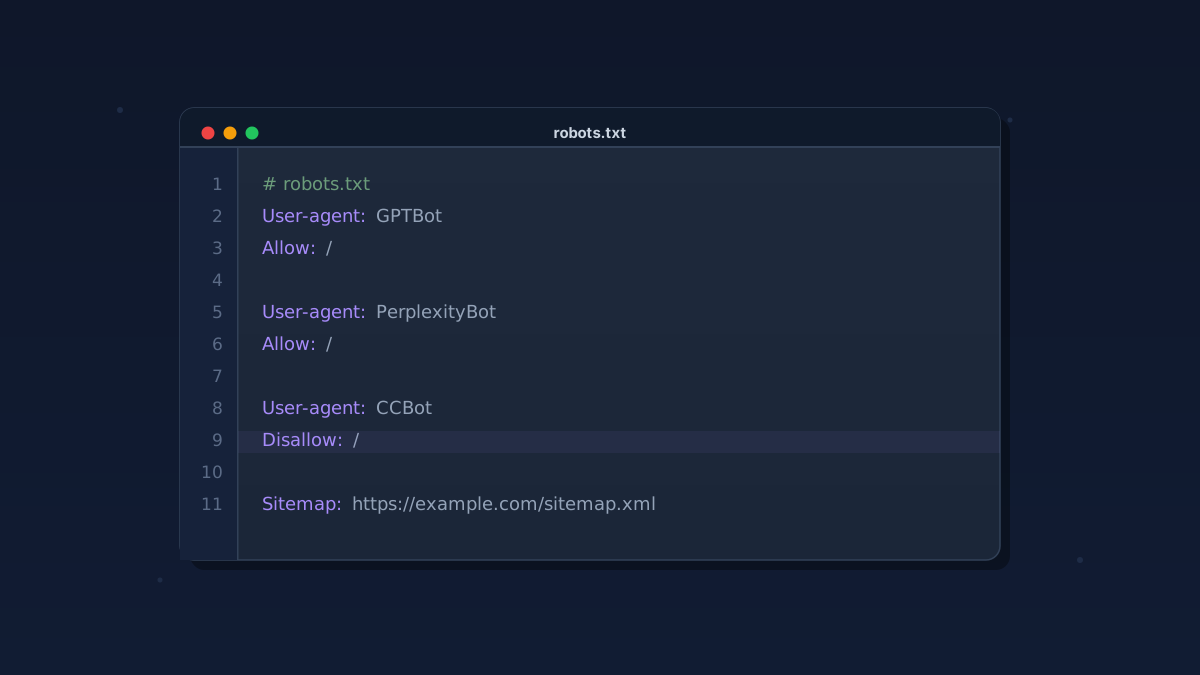
User-agent: GPTBot
Disallow: /

User-agent: CCBot
Disallow: /

User-agent: OAI-SearchBot
Allow: /

User-agent: PerplexityBot
Allow: /
The Allow: / lines are optional since allowing is the default. But if your file has a broad User-agent: * block anywhere, being explicit about which retrieval bots you want to reach you prevents accidents.
That catch-all is exactly the most common mistake: a User-agent: * Disallow: / meant to stop generic scrapers ends up catching PerplexityBot or OAI-SearchBot too. Use the robots.txt tester to confirm what your current file actually allows, bot by bot, before assuming it's correct.
What robots.txt can't actually do
robots.txt is a request, not a wall. A well-behaved crawler reads it and complies. A crawler that decides to ignore it can, and several AI scrapers have been caught doing exactly that.
If you genuinely need to stop a bot rather than politely ask it to leave, you handle it at the edge, in your CDN or web application firewall. Cloudflare now ships one-click toggles for the known AI crawlers.
The risk with edge blocks is real. User-agent strings can be spoofed, and an IP-range block can catch Googlebot, a monitoring service, or a customer behind a shared address. Use robots.txt for intent. Save WAF rules for crawlers that have proven they won't respect the file.
What most sites should actually do
A sensible default for a typical business or content site: allow retrieval crawlers, and decide separately on training crawlers based on how you feel about your work feeding model training.
- You want AI citations and traffic: allow OAI-SearchBot, PerplexityBot, and other retrieval bots. This is the whole point of getting cited by ChatGPT, Perplexity, and AI Overviews.
- You want to opt out of training: block GPTBot, CCBot, and Google-Extended. You keep the citations and lose the training data contribution.
- You're dealing with aggressive scraping load: block Bytespider at the WAF as well as in robots.txt, since it doesn't reliably respect the file.
Whatever you choose, the failure mode to avoid is a stale robots.txt blocking everything because it was written in a panic two years ago. That's how legitimate sites vanish from AI search without anyone noticing.
Not sure what your current file is actually allowing? The AI Bot Access Checker reads your live robots.txt and tells you, crawler by crawler, which AI bots can reach your pages today.
Want to check your robots.txt alongside your full technical SEO picture? A free SEO audit covers both in about a minute, no signup required.
Kaustav Basak is the creator of SEO AI Audits, a free AI-powered SEO toolkit. He writes about technical SEO, Core Web Vitals, and how search is changing in the age of AI assistants.
Put this into practice — free
Run a complete, AI-powered SEO audit of your site in about a minute. No signup.