What Is llms.txt? A Practical Guide for 2026
llms.txt is a plain-text file that gives AI assistants a clean map of your most important pages. Here's what it is, the spec, why it helps, and how to make one.
I want to be upfront about something before we go any further. llms.txt is not a confirmed ranking signal. The major AI crawlers haven't committed to reading it the way they honour robots.txt. Some products that fetch pages live may ignore it entirely.
With that said: it takes about 20 minutes to make a good one, the cost of getting it wrong is zero, and the potential upside — an AI assistant reading your curated content summary instead of guessing at your site from raw HTML — makes it worth the small effort.
Here's what it actually is and how it works.
What problem is it solving?
When an AI assistant tries to understand a website, it runs into the same walls a human skimmer does — only worse. A typical HTML page is buried in navigation menus, cookie banners, sidebar widgets, and JavaScript that the model may never execute. Pulling a useful answer out of that takes token budget that could have gone toward understanding your actual content.
llms.txt is a workaround. Instead of leaving the model to guess which of your 500 URLs matter, you write one short file that says in plain prose: here is who we are and here are the twelve pages worth reading. It's a table of contents written for language models instead of crawlers.
It's also worth being clear about what it is not. robots.txt tells crawlers what they can't access. sitemap.xml lists every URL for completeness. llms.txt is the opposite of completeness — it's a deliberate shortlist, written in prose a model can read directly.
What the format looks like
The spec is intentionally minimal — standard Markdown with a loose structure. Any model that can read text can parse it.
| Section | Required | What it is |
|---|---|---|
| H1 title | Yes | Your site or project name |
| Blockquote summary | Recommended | One sentence on what you do |
| Free text | Optional | A paragraph or two of extra context |
| Link sections | Yes | H2 headings grouping curated links as a list |
| Optional section | Optional | Links the model can skip if it's short on budget |
Each link is a standard Markdown list item: - [Page name](url): one-line description. The description after the colon is the part that makes the file useful — it tells the model what it'll find on the page before spending a request to fetch it.
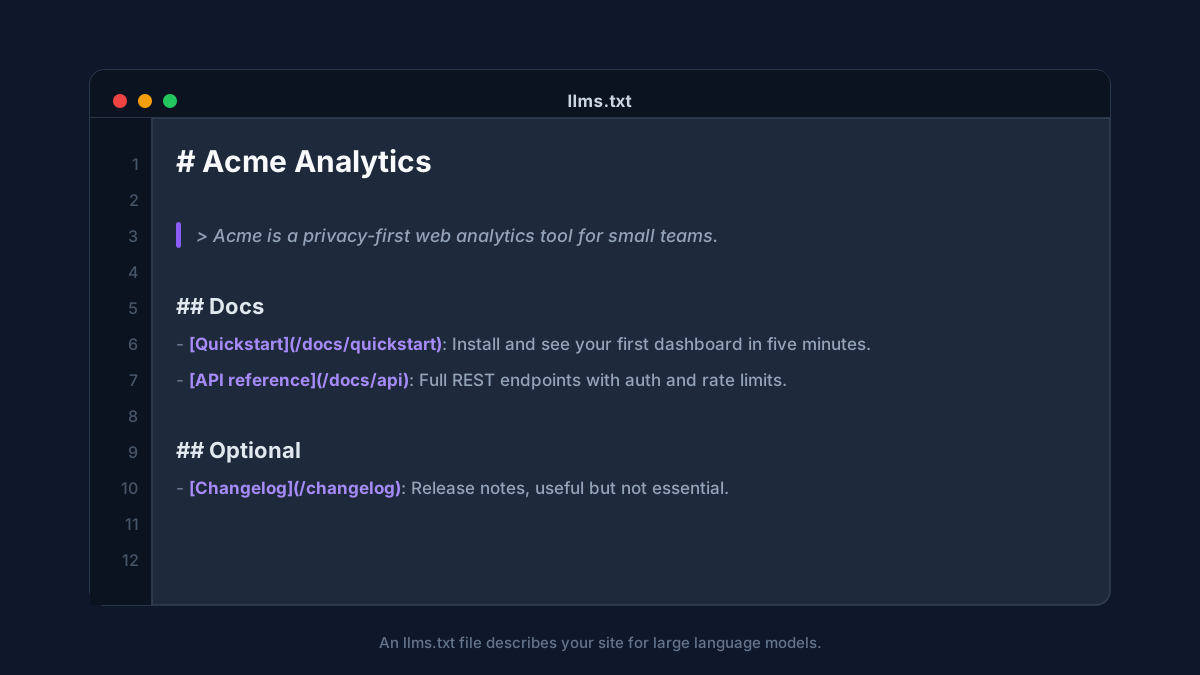
A minimal but complete example:
# Acme Analytics

> Acme is a privacy-first web analytics tool for small teams.

## Docs

- [Quickstart](https://acme.com/docs/quickstart): Install and see your first dashboard in five minutes.
- [API reference](https://acme.com/docs/api): Full REST endpoints with authentication and rate limits.

## Optional

- [Changelog](https://acme.com/changelog): Release notes, useful but not essential reading.
There's also a convention for an llms-full.txt file that inlines the full content of those pages into one document, so a model can read everything in a single fetch. That file grows large quickly. Most sites are better off with the lean llms.txt and letting models follow links as needed.
Why it actually helps
Three concrete reasons, none of them magic:
It's more efficient. Models work inside a fixed token budget. Pointing straight at clean, relevant pages means less budget spent parsing navigation and boilerplate, and more on your actual content.
It improves how you're framed. When you write the one-line descriptions yourself, you control how your pages are introduced to the model. It's less likely to misrepresent what you offer if you've told it plainly what each page covers.
It signals intent. Publishing the file tells AI tools you want to be read and cited. Being referenced by AI assistants is becoming its own traffic channel, and llms.txt is one piece of making your site easy to quote. It pairs naturally with the on-page work in how to get cited by ChatGPT, Perplexity and AI Overviews.
How to make one
You can write it by hand in about 20 minutes:
- Pick your highest-value pages. Documentation, pricing, key product pages, your best guides. Aim for 10 to 30 links, not your entire sitemap.
- Write the title and summary. One H1 with your name, one blockquote that explains what you do in a sentence.
- Group the links under H2 headings. Cluster by purpose: Docs, Guides, Products, About. Write a short, factual description for each link.
- Move nice-to-have links under Optional. This tells a model what it can safely skip if it's running low on budget.
- Put it at `/llms.txt` on your domain and serve it as
text/plain.
If you'd rather start from a generated draft than a blank file, the llms.txt generator builds a spec-compliant version from your URL, with first-pass descriptions you can edit.
How to validate it
A file that exists but is malformed doesn't help anyone. Two things to check. Structure: an H1 title, at least one link section, valid Markdown link syntax, and URLs that actually resolve. Delivery: the file must be reachable at /llms.txt and served as plain text, not wrapped in your site's HTML.
The fastest check is the llms.txt validator, which fetches your file, checks it against the spec, and flags broken links, missing sections, or wrong content types. Worth re-running whenever you restructure your site — a stale file pointing at dead URLs is worse than none.
Should every site have one?
If you have content you want AI assistants to understand and accurately represent, yes — and the cost is close to zero. Documentation sites and developer tools get the clearest benefit, but any business that wants accurate AI representation gains from making it easy for models to navigate their content.
Keep it lean and keep the descriptions honest. A short, accurate file beats a sprawling one that no longer matches your site. Revisit it when things change.
Want to see how AI-ready your whole site is beyond this one file? A free SEO audit checks your structure, machine-readable signals, and content clarity in about a minute, no signup required.
Kaustav Basak is the creator of SEO AI Audits, a free AI-powered SEO toolkit. He writes about technical SEO, Core Web Vitals, and how search is changing in the age of AI assistants.
Put this into practice — free
Run a complete, AI-powered SEO audit of your site in about a minute. No signup.