We Audited 223 Websites. These SEO Problems Showed Up on Almost Every One
Real data from 223 website audits and 43,368 pages: the SEO, accessibility and security problems most sites share, which ones matter, and the order we'd fix them in.
Every week we total up the audits run on this site and publish the counts on our research page. Names never leave the database; only totals do. This post looks at the 90 days from 11 August to 9 November 2026: 223 websites and 43,368 pages.
One caveat before the numbers. These are sites people chose to audit, not a random sample of the web. They lean towards owners who already care about SEO, so if anything the real web is in worse shape than this.
The headline: most sites are fine, and most sites have the same gaps
The median site scored 82 out of 100. Only 5 of the 223 scored below 60, and 30 scored 90 or more. So this is not a story about broken websites. It's a story about the same handful of small gaps appearing again and again, on sites that are otherwise in decent shape.
The averages by area tell you where those gaps sit:
| Area | Average score |
|---|---|
| Technical SEO | 85.8 |
| Speed | 84.5 |
| AI search (three layers) | 84.8 to 87.1 |
| Content | 74.9 |
| Accessibility | 73.5 |
| Security headers | 71.4 |
| On-page (titles, headings, descriptions) | 70.0 |
The basics that hosting platforms and CMSs now handle for you (HTTPS, crawlability, sitemaps) score well. The parts a person has to write or configure by hand score worst.
The problems most sites share
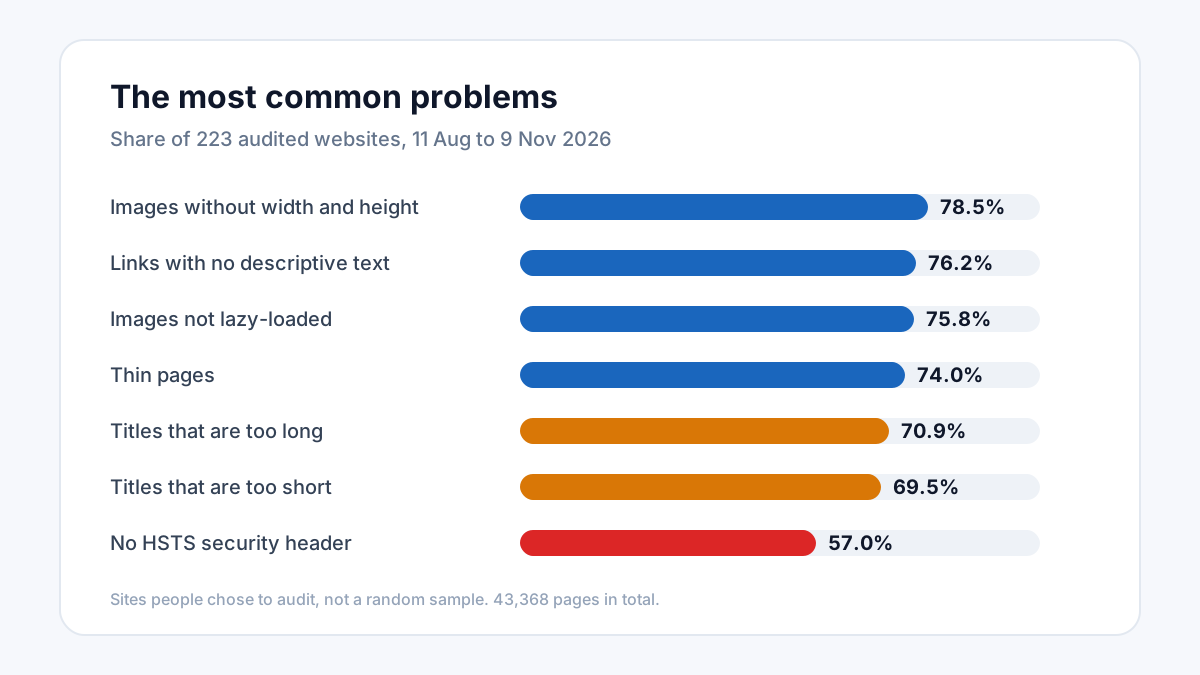
Here are the ten most common findings, with the share of sites that had each one:
| Problem | Sites affected |
|---|---|
| Images without width and height | 78.5% |
| Links with no descriptive text | 76.2% |
| Below-the-fold images not lazy-loaded | 75.8% |
| No Permissions-Policy header | 75.3% |
| Thin pages (very little text) | 74.0% |
| No "skip to content" link | 73.5% |
| Titles that are too long | 70.9% |
| Headings that skip a level | 70.0% |
| Titles that are too short | 69.5% |
| No Content-Security-Policy header | 65.9% |
A few things stand out to us.
Titles are wrong in both directions. Seven in ten sites have at least one title that is too long, and almost as many have one that is too short. That usually means titles were never written at all: they were left to a theme or plugin default. Six in ten also have duplicate titles, which is the same root cause.
Images cause layout shift on most sites. An image without width and height makes the page jump as it loads, which hurts your Cumulative Layout Shift score. It's one of the easiest fixes on this list: set the dimensions and the browser reserves the space.
Thin pages are everywhere. Three quarters of sites have pages with very little text. Often these are tag archives, empty category pages or contact pages, and they're not all a problem. But a thin page that you want to rank needs more substance, and one you don't want to rank is better merged or kept out of the index. Our thin content guide covers how to decide.
Links that say nothing. "Click here", "read more" and icon-only links with no text appeared on 76% of sites. Screen readers announce them as just "link", and search engines lose a signal about the page they point to.
Further down the list
Outside the top ten, two findings are worth calling out because they are more serious than they are common:
- No HSTS header on 57% of sites. HSTS tells browsers to always use HTTPS for your domain. Without it, the first visit can still be intercepted. We rate this high priority, and it's a single header to add.
- No author information on 57% of sites. Pages with no named author or organisation give search engines and AI assistants less to go on when judging who is behind the content.
The order we'd fix them in
If your site matches this pattern, here is the order we'd work in, cheapest and most valuable first:
- Security headers. HSTS, X-Frame-Options and X-Content-Type-Options are one-time server settings. An afternoon's work, then done for good.
- Image dimensions and lazy loading. Usually one theme or template change fixes every page at once.
- Titles. Write a real title for your important pages, 30 to 60 characters, each one different.
- Link text. Replace "read more" with words that say where the link goes.
- Thin pages. Decide page by page: expand, merge, or keep out of the index.
None of this needs a big budget. Most of it is the kind of work that slipped through when the site was built, and stays unnoticed because nothing visibly breaks.
Check your own site
These counts update every Monday on the research page linked at the top, where you can also see the full list. If you want to know which of these your own site has, the free audit checks all of them across up to 600 pages, no signup needed.
SEO AI Audits builds free, AI-powered SEO tools and writes practical guides on technical SEO, Core Web Vitals, and how search is changing in the age of AI assistants.
Put this into practice — free
Run a complete, AI-powered SEO audit of your site. No signup.