Is Your Website Ready for AI Agents? A Practical Checklist
AI agents now fill in forms, compare prices and book things for people. Here's what they need from your website, and the small fixes that stop them getting stuck.
For most of the web's history, two kinds of visitor mattered: people, and search engine crawlers. A third kind is now turning up. AI agents are assistants that don't just read your page and summarise it. They click, type and submit on someone's behalf: "find me a plumber who can come on Saturday and book them", "compare these three plans and sign me up for the cheapest".
We started checking for this in our audits after watching agents fail on perfectly good websites. The sites looked fine to a person. To an agent, the form fields had no names, the main button was an unlabelled icon, and the prices were baked into an image.
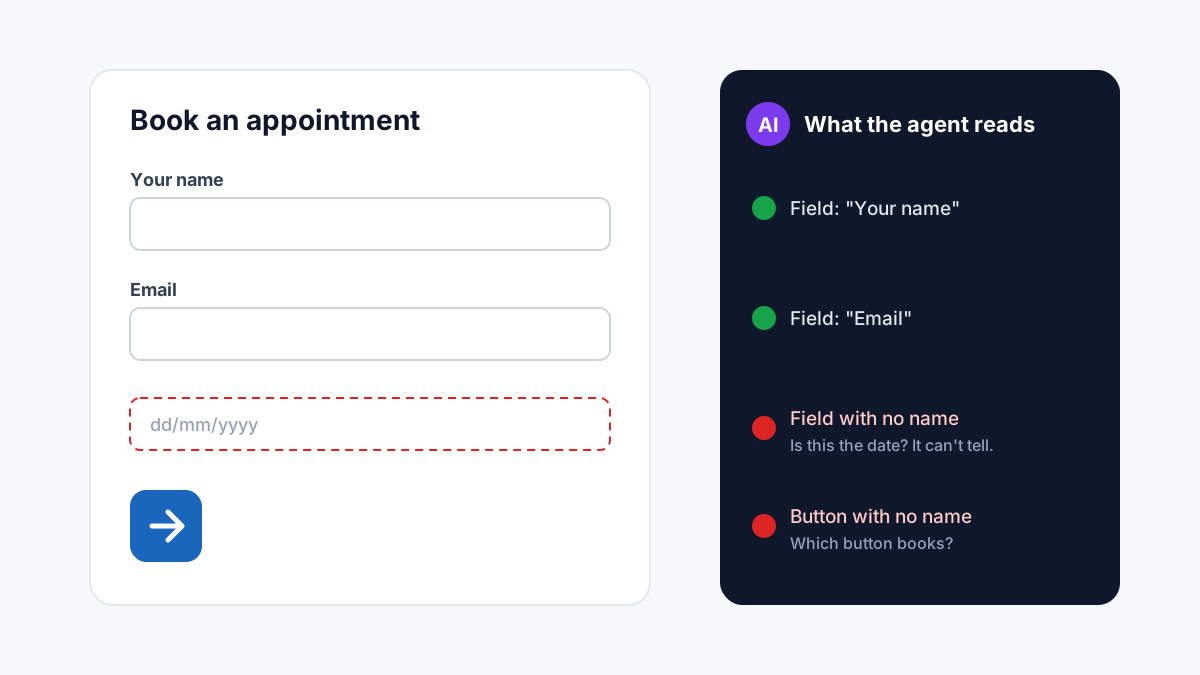
How an agent sees your page
An agent can't rely on your design the way a person does. Most agents read the page through its structure: the text, the links, and the names that form fields and buttons expose to assistive technology. That's the same layer a screen reader uses.
This is useful to know, because it means the work overlaps almost completely with accessibility. If a blind visitor using a screen reader can complete your booking form, an agent probably can too. If they can't, the agent will usually stall at the same spot.
The checklist
1. Every form field has a label
A field with only placeholder text ("Your email") loses its name the moment someone starts typing, and some agents never see the placeholder at all. Give each input a proper <label>, or at least an aria-label. Our guide to labelling form inputs shows the exact markup.
This is the most common failure we see. On our own homepage, the first run of this check found two unlabelled fields out of nine. We fixed them the same day.
2. Buttons say what they do
An icon-only button (a magnifying glass, an arrow, a cart) needs a text name an agent can read. "Submit" is better than nothing; "Book appointment" is better still. Agents choose which button to press by its name, so vague names lead to wrong clicks.
3. No CAPTCHA on the path that matters
CAPTCHAs exist to stop bots, and an agent is a bot acting for a real person. If a CAPTCHA guards your contact form or checkout, the agent stops there and the person has to finish by hand, or goes somewhere easier.
We're not saying remove spam protection. But consider quieter options for your key forms, such as honeypot fields or rate limits, and keep the heavier challenges for places that really attract abuse.
4. Contact details are written as text
A phone number inside an image, or an email address shown only after a click, is invisible to an agent asked to "get me their phone number". Put your phone, email and address on the page as plain text. A tel: or mailto: link is even better.
5. Prices can be read without guessing
If someone asks an agent "how much is the basic plan?", it needs to find the number. Prices written as text work. Prices in images, or loaded only after choosing options in a custom widget, often don't. For products, structured data (Product with an Offer) states the price in a form machines read reliably.
6. Who you are is stated clearly
Before an agent books or buys, it may check that it has the right business. A clear name, address and contact page, plus Organization structured data, help it confirm that this is you and not a similarly named company in another city.
What not to worry about
You don't need a special "agent version" of your site, and there's no single file that makes a site agent-ready. Some people suggest llms.txt for this. It's harmless, but it's a reading aid, not something agents use to fill in forms.
You also don't need to rebuild. Every item above is a small change to markup you already have.
Checking your own site
You can test the basics yourself: try completing your main form using only the keyboard, and turn on a screen reader for a minute. Where you get stuck, an agent will too.
Our free audit now runs these checks automatically: it looks for unlabelled fields, unnamed buttons, CAPTCHAs, findable contact details and readable prices, and shows the results in the AI search tab of the report.
SEO AI Audits builds free, AI-powered SEO tools and writes practical guides on technical SEO, Core Web Vitals, and how search is changing in the age of AI assistants.
Put this into practice — free
Run a complete, AI-powered SEO audit of your site. No signup.